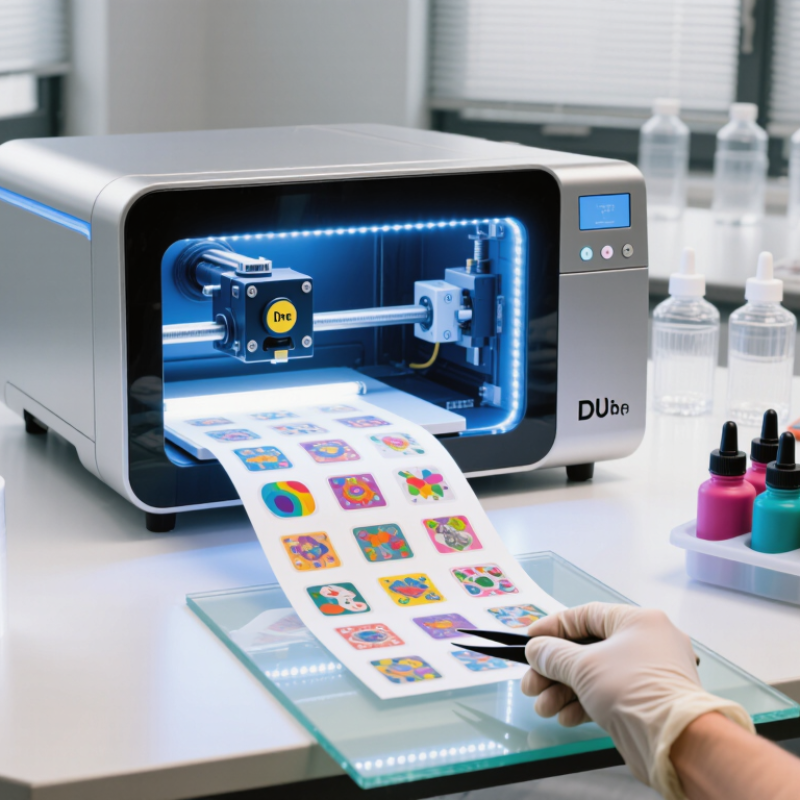
A Stickers UV DTF Inkjet Printer combines piezoelectric inkjet technology, UV-curable inks, and a transfer-film workflow. It prints a sticker design onto coated film, applies white ink and varnish, then bonds the image to a carrier film. After pressing, the design can adhere to bottles, tumblers, phone cases, acrylic panels, and other hard surfaces.
The market context is significant. Grand View Research valued the global digital printing market at approximately US$34.02 billion in 2023 and projects continued growth through 2030. Smithers also identifies short runs, customization, and packaging personalization as important drivers for digital print adoption. These figures describe digital printing broadly, not UV DTF alone. That distinction matters.
Sean Smyth, a print-industry consultant at Smithers, offers a useful principle: “Digital print earns its place when it adds value, not merely volume.” A Stickers UV DTF Inkjet Printer reflects that idea through low-volume production and detailed graphics. It can reduce weeding work and simplify irregular-surface decoration. Still, it is not magic. Dust, weak adhesive contact, poor curing, and incorrect film settings can create peeling edges or cloudy colors. Operators must test adhesion, flex resistance, and surface compatibility before promising durability. The technology looks simple on a workbench. Production reality is less forgiving. This guide examines its printing process, equipment structure, suitable materials, practical limitations, and the operating choices that influence final sticker quality.
What Is a Stickers UV DTF Inkjet Printer?
A stickers UV DTF inkjet printer creates durable transfers for hard, smooth surfaces. It prints UV-curable ink onto a special film layer. A second adhesive film then carries the finished design. Unlike ordinary sticker printing, this process does not require cutting every outline. The transfer can include fine text, gradients, and raised ink effects. After application, the graphic feels slightly textured under a fingertip.
In practical use, operators print the artwork, laminate it, and press it onto a clean object. Glass, coated metal, acrylic, and rigid plastic often work well. The surface must be dry and free from oil. Adhesion can vary with texture, temperature, and coating quality. A design may look perfect on film but fail on a dusty container. My early tests exposed another weakness: tiny letters sometimes lost clarity after transfer. Smaller designs need careful adjustment and inspection.
Tips: Test one sample first. Use simple artwork for small objects. Let the printed film cure fully. Apply steady pressure from one edge. Smooth out air pockets with a scraper. Store films flat and away from heat. Do not assume every surface is compatible. Check durability after cleaning, rubbing, and moderate moisture exposure. Record successful settings, because repeating a result can be harder than expected.
| Data Dimension | Typical Information | How It Relates to Sticker Production |
|---|---|---|
| Definition | A UV DTF inkjet printer is a digital printing system that uses ultraviolet-curable inks to print sticker graphics onto a film-based transfer system. | It creates durable, ready-to-apply graphics that can be transferred to many hard or semi-hard surfaces. |
| Printing Process | The design is printed onto a printable film, cured with UV light, laminated with an adhesive film, and then transferred to the target surface. | The process eliminates the need for traditional cutting around every individual sticker shape. |
| Ink Types | Common ink channels include cyan, magenta, yellow, black, white, and sometimes a clear varnish layer. | White ink supports bright colors on dark or transparent materials, while clear ink can add gloss or texture effects. |
| Curing Method | UV LEDs cure the ink immediately after deposition by exposing it to ultraviolet light. | Instant curing allows printed layers to be handled soon after printing and helps preserve fine details. |
| Typical Resolution | Many professional systems operate in the range of approximately 600 to 1,440 dpi, depending on the selected print mode. | Higher resolution can improve small text, thin lines, gradients, and detailed illustrations. |
| Typical Print Width | Common desktop and mid-size configurations support printable widths from approximately 300 mm to 600 mm. | The available width affects the maximum sticker sheet size and the number of designs that can be printed in one run. |
| Material Compatibility | Suitable transfer films are generally designed for smooth, clean surfaces such as coated metal, glass, acrylic, plastic, ceramic, and sealed wood. | Surface testing is recommended because adhesion can vary according to texture, coating, oil, moisture, and curvature. |
| Surface Requirements | The application surface should be dry, dust-free, grease-free, and sufficiently smooth for firm contact. | Proper surface preparation reduces lifting, bubbles, incomplete transfer, and premature peeling. |
| Color Performance | UV-curable inks can produce saturated colors and opaque white layers when the printer is correctly calibrated. | Color appearance depends on ink configuration, film quality, print mode, curing settings, and viewing conditions. |
| Durability | Finished transfers are generally resistant to everyday abrasion, moisture, and light exposure, but performance varies by ink, film, and application. | For outdoor or high-contact use, testing under the intended environmental conditions is advisable. |
| Surface Texture | Unlike conventional thin adhesive labels, UV DTF transfers may have a noticeable raised or layered feel because the cured ink remains on the surface. | This effect can be used for decorative, tactile, glossy, or dimensional sticker designs. |
| Production Speed | Output speed depends on print width, resolution, white-ink coverage, varnish use, image complexity, and the number of passes. | Reducing unnecessary white or clear layers can improve throughput, while high-detail modes require more production time. |
| Design Workflow | Artwork is normally prepared in a raster or vector design application and sent to the printer through RIP or printer-control software. | Transparent backgrounds, correct color profiles, suitable bleed, and properly separated white layers help prevent production errors. |
| Finishing Steps | After printing and curing, the design is laminated, cut into manageable sections if needed, and transferred by pressure onto the final surface. | The application process is typically simpler than applying individually weeded adhesive vinyl for intricate artwork. |
| Suitable Applications | Typical uses include product decoration, packaging accents, promotional items, personalized gifts, signage details, and small-batch merchandise. | It is especially useful for complex full-color graphics, small production runs, and designs with fine details. |
| Main Advantages | On-demand production, full-color printing, detailed graphics, immediate UV curing, and compatibility with many rigid or semi-rigid surfaces. | These characteristics can reduce setup time and make customized sticker production more flexible. |
| Main Limitations | Consumables require controlled storage, UV inks need regular maintenance, and adhesion is not equally reliable on every surface. | Operators should follow ink, film, ventilation, cleaning, and curing recommendations and conduct application tests before selling finished products. |
| Safety Considerations | Uncured UV ink should not contact skin or eyes. Work areas should have appropriate ventilation, and operators should follow the printer and ink safety documentation. | Correct handling protects operators and helps prevent contamination, print defects, and incomplete curing. |
| Best Fit for Production | UV DTF is well suited to customized, short-run, medium-run, and multi-design sticker work where direct printing onto the final object is impractical. | It offers a practical alternative when the product shape, size, or material makes direct UV printing difficult. |
It uses PET release film, adhesive film, UV-curable ink, and clear varnish.
The usual set contains CMYK colors, white ink, and clear varnish.
Printheads place tiny ink droplets onto the film. UV LED lamps cure each layer quickly.
Suitable surfaces include glass, metal, acrylic, plastic, and coated wood.
Common examples include bottles, phone cases, gift boxes, signs, and cosmetic packaging.
It supports detailed lettering, gradients, vivid colors, and raised decorative effects.
No. Dust, oil, rough textures, and flexible materials can weaken adhesion.
Clean it with a suitable lint-free cloth. Remove dust, oil, and visible residue.
Uneven roller pressure may cause wrinkles or incomplete transfers.
Check color calibration regularly and store films properly. Use steady pressure and suitable curing settings.
A Stickers UV DTF Inkjet Printer is a specialized digital printing device designed to produce vivid, durable stickers on a wide range of smooth or irregular surfaces. It combines inkjet technology with ultraviolet curing, allowing printed designs to dry quickly and retain sharp details, strong color, and good resistance to moisture, scratches, and everyday wear. Unlike traditional sticker printing, the UV DTF process can create transfer-style graphics that are applied directly to products without requiring conventional adhesive labels.
The process typically uses UV-curable inks, a printable film, a transfer film, and a curing system. It is suitable for personalized gifts, packaging, promotional items, crafts, signage, and small-batch product decoration. Its main advantages include flexible material compatibility, fast production, low setup requirements, and the ability to create complex designs without cutting each shape individually. For reliable results, operators should prepare artwork correctly, keep the printer and films clean, monitor ink and curing conditions, and perform regular maintenance according to the equipment’s operating guidelines.

+91-79-26840551 / 52 / 53
Domestic: +91 7575 009 654 · Export: +91 7043 505 091
[email protected]
International: [email protected]
Plot No.3, Road No.1, Kathwada GIDC, Kathwada, SP Ring Road, Ahmedabad 382430, Gujarat, India