Choosing a Woodworking CNC Router Machine is less about buying the biggest model and more about matching its capabilities to your actual work. A hobbyist cutting signs has different needs from a shop nesting cabinet parts on full sheets. Start by listing the materials, typical project sizes, and weekly workload you expect. Then compare the machine’s cutting area, spindle power, frame construction, and control system against that list. Small details matter. Can the bed support a 4-by-8-foot sheet? Does the spindle suit your usual cutters? Is dust collection practical in your workspace? These questions can prevent costly mismatches.
The seven tips in this guide focus on decisions buyers can verify: machine size, rigidity, spindle and tooling, software compatibility, safety features, support, and total ownership cost. Ask suppliers for clear specifications, warranty terms, and realistic examples of cuts in comparable materials. If possible, inspect a working machine or request a sample cut. A polished demonstration is useful, but it may not reveal setup time, noise, or maintenance needs. A larger router is not automatically better, and a low purchase price can hide expenses for tooling, extraction, software, or installation. That is easy to miss. Be honest about what you still need to learn, too. Careful comparison will not guarantee perfect results, but it can help you choose a router suited to your projects, budget, and available space.
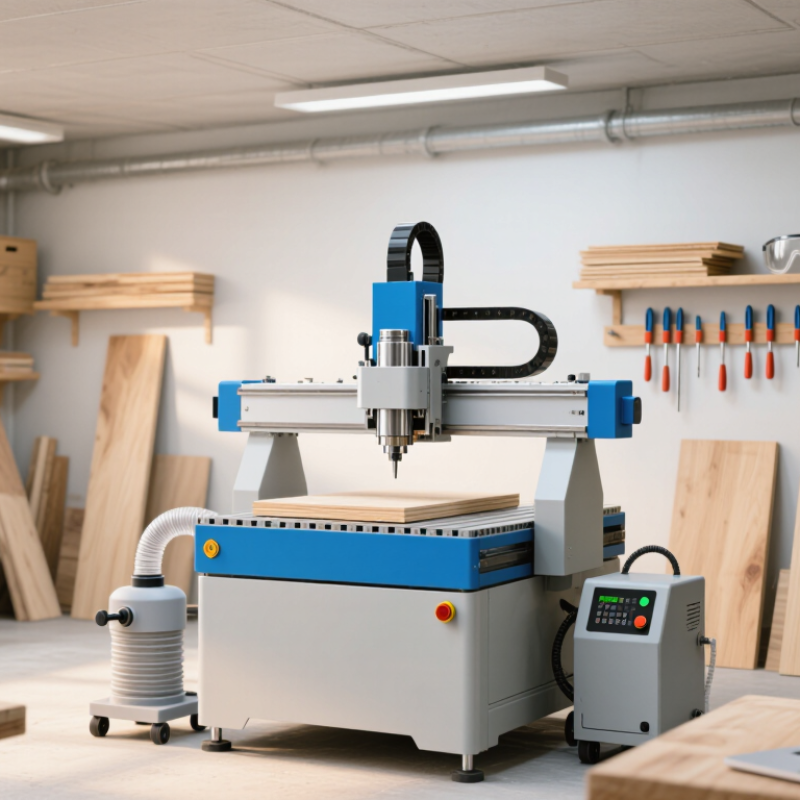
Start with the parts you will actually make: cabinet doors, carved signs, nested furniture panels, or small components. Record each part’s dimensions, thickness, edge detail, and monthly quantity. That list is more useful than choosing a machine by advertised spindle power. Include your largest sheet and the clearance needed to load it safely.
Materials change the decision. The USDA Forest Products Laboratory’s 2021 Wood Handbook places wood’s fiber saturation point near 30% moisture content; below it, moisture changes can cause wood to shrink or swell. That matters for fit and finish. Note whether you plan to cut plywood, MDF, solid hardwood, or all three, and test representative stock before committing. One test cut can reveal tear-out, hold-down problems, or a toolpath that takes too long.
Production needs are easy to misjudge. Estimate daily cutting hours, setup time, tool changes, and how often jobs repeat. A machine that fits one custom panel may struggle with a full sheet and repeated batches. Check the working area, dust collection, vacuum hold-down, and file workflow against your real shop conditions. I would leave room for growth, but not buy capacity you cannot keep busy. Plans change. A small trial job is a useful reality check.
A woodworking CNC router should match the work you regularly make, not the biggest project you might attempt someday. For cabinets and sheet goods, a fixed-bed machine with ample usable travel can reduce repositioning and alignment errors. A compact gantry router may fit signs, furniture parts, or a crowded workshop better. Check the working area, not only the table dimensions. Clamps, dust boots, and tool changes all need clearance. Leave some room. An oversized machine can strain your budget and workshop, and a poorly supported frame may flex under load.
Router type affects both capacity and setup. A moving-gantry design can handle larger panels, while a moving-table design may feel more rigid on smaller parts. Compare the machine’s structure with the materials and cutting depth you expect to use; thicker stock demands more than a large table. Axis configuration matters, too. Three axes suit most flat panels and carved surfaces. A rotary fourth axis can machine turned legs or cylindrical components, but it needs extra clearance and setup time. Five-axis capability can reach complex angles, yet it adds cost and programming demands. It is easy to overestimate how often those movements will be useful. Before buying, sketch a typical part and check whether it fits the machine with the clamps in place.
| Tip | Decision Area | Practical Guidance | What to Check Before Buying |
|---|---|---|---|
| 1 | Router type | A gantry router suits sheet goods and larger panels. A compact benchtop machine can fit small parts and limited shop space. Industrial machines are designed for heavier workloads and production environments. | Match the machine’s frame, footprint, and intended duty cycle to your materials, available floor space, and expected production hours. |
| 2 | Work area | Choose usable X and Y travel that accommodates your largest planned workpiece, including room for clamps, tabs, and toolpaths. A standard 4 × 8 ft sheet measures 48 × 96 in (about 1,219 × 2,438 mm), but the machine’s usable travel may be smaller than its advertised table size. | Ask for actual cutting travel, not just table dimensions. Check Z clearance for the thickest stock, fixtures, and any raised workholding. |
| 3 | Axis configuration | A 3-axis router moves in X, Y, and Z and handles most flat-panel cutting, profiling, and carving. A 4th rotary axis can machine suitable work around a cylindrical or indexed axis. A 5-axis machine can orient the tool for angled surfaces and more complex shapes. | Buy extra axes only when your parts require them. Confirm the machine’s working envelope, compatible CAM output, and operator training needs for rotary or multi-axis work. |
| 4 | Frame and motion system | A rigid frame and well-supported motion components help the machine resist cutting forces. Machine construction and setup affect vibration, accuracy, and surface finish, especially during demanding cuts. | Review the frame construction, gantry support, guides, drive system, and maintenance requirements. If possible, inspect a test cut in material similar to your own. |
| 5 | Spindle and tooling | Spindle power, speed range, collet size, and duty rating should suit your cutters and materials. The correct feed, speed, cutter, and chip load depend on the tool and job; higher power alone does not guarantee a better cut. | Check supported tool shanks, spindle cooling, tool-changing method, and whether the machine can run the cutters and materials in your typical jobs. |
| 6 | Workholding and dust collection | A spoilboard with clamps or a vacuum table can help hold stock during cutting. Wood routing creates chips and fine dust, so effective extraction and suitable shop dust controls are important. | Check how parts are secured, how the spoilboard is maintained, and what dust-collection connections and airflow requirements the machine specifies. |
| 7 | Software, support, and total cost | CNC work typically involves CAD/CAM software, toolpath generation, and a compatible machine controller. The purchase cost is only one part of ownership; tooling, dust collection, installation, training, and maintenance can add to the budget. | Confirm software and file-format compatibility, training availability, warranty coverage, service access, replacement-part availability, and the full installed cost. |
A router’s spindle should match the material, cutter diameter, and depth of cut—not just the biggest number on its specification sheet. Higher power can help maintain cutting speed in dense hardwood, but it also demands a rigid frame and suitable electrical supply. Check the spindle’s rated power, speed range, cooling method, and duty rating. Ask for a test cut in your own material. A clean edge matters more than a dramatic horsepower claim.
Motion hardware determines whether the machine holds that cut across a full sheet. Inspect the guide rails, drive system, gantry, and bearing arrangement; even strong components can disappoint if poorly aligned. ISO 230-2:2014 outlines methods for measuring machine-tool positioning accuracy and repeatability. Request a test report with measured values across the working area, not just the controller’s resolution. For example, a display reading of 0.01 mm does not prove the cutter returns within 0.01 mm. Check accuracy with repeated moves and a test pattern, then inspect the actual dimensions. Small deviations accumulate. I would also ask how calibration changes after routine use; that question is easy to overlook.
Before buying a woodworking CNC router, check whether its software fits the way you already work. Confirm that your design files import correctly and that the machine’s control software supports your computer’s operating system. Ask how toolpaths are previewed and whether a suitable post-processor is included. A test file can reveal awkward steps before the router is installed. Small details matter. I once overlooked how much time file conversion could add to a simple job; compatibility deserves more than a quick checkbox.
Safety features should be practical, not merely listed in a brochure. Look for an accessible emergency stop, clear instructions for isolating power, and guarding around moving parts. Consider how dust extraction connects, since fine wood dust can quickly collect near the cutting area. Check installation needs too: measure doorways, floor space, and clearance for full table travel. Confirm electrical requirements, machine weight, leveling instructions, and whether professional setup is recommended. A layout that looks workable on paper may feel cramped once the dust hose and material supports are in place. I would leave extra room.
The bars count practical checks in this buyer checklist for each topic. They are checklist counts, not market-survey results. Confirm software compatibility, safety provisions, and site requirements with the machine supplier before purchase.
When comparing woodworking CNC routers, look beyond the machine’s sticker price. A low quote may exclude the vacuum table, dust-extraction fittings, software, or delivery and installation. Ask for an itemized offer, then compare machines with similar working areas, spindle power, and controllers. Otherwise, the cheapest option may only look cheaper. Check whether tooling, collets, and starter bits are included; these small items add up. Confirm electrical requirements and floor-space needs before purchase. A poor fit gets expensive.
Estimate monthly costs for electricity, replacement bits, filters, lubrication, and routine maintenance. Ask how often key parts need service and what replacement parts cost. Downtime matters, too. A stopped router can delay orders while you wait for a part or technician. Before buying, ask what technical support includes: setup guidance, operator training, remote troubleshooting, and warranty coverage. Get typical response times and parts lead times in writing. A quick video call may solve a setup issue, but not a damaged spindle. Support promises can sound vague; pin down the details, even if the conversation feels awkward.
Write down the parts you make, their dimensions, thicknesses, edge details, and monthly quantities. Include your largest sheet and loading clearance.
Test representative plywood, MDF, or hardwood. One test cut can reveal tear-out, hold-down issues, and unexpectedly slow toolpaths. It is easy to skip this step.
Track daily cutting hours, setup time, tool changes, and repeat jobs. Check the working area against your actual sheets and shop layout. Leave some room.
Match spindle power and speed to your material, cutter diameter, and cutting depth. Ask for a test cut in your own stock. Inspect the edge.
Inspect the rails, drive system, gantry, and bearings. Request measured accuracy results across the work area, then check repeated moves and test-pattern dimensions. Displays can mislead.
Ask whether the quote includes the vacuum table, dust fittings, software, delivery, installation, tooling, collets, and starter bits. Small extras add up.
Budget for electricity, replacement bits, filters, lubrication, and maintenance. Ask how often parts need service and what replacements cost.
Ask about setup help, operator training, remote troubleshooting, warranty coverage, response times, and parts lead times. Get details in writing. Awkward, but worthwhile.
Choosing a Woodworking CNC Router Machine starts with a clear understanding of the projects you plan to make, the materials you will cut, and the production volume you expect. These needs help determine the appropriate router type, work area, and axis configuration. Consider the size and complexity of your designs, as well as whether the machine can handle your materials consistently.
Before buying, compare spindle power, motion components, and cutting accuracy to ensure the machine suits your work. Check that its software is compatible with your workflow, and review safety features, installation requirements, and available workspace. Look beyond the purchase price by estimating ongoing costs such as maintenance and tooling, and consider how accessible technical support will be. Careful comparison across these factors can help you choose a reliable machine that fits both your current needs and future plans.

+91-79-26840551 / 52 / 53
Domestic: +91 7575 009 654 · Export: +91 7043 505 091
mktg@www.toughmachinery.com
International: export@www.toughmachinery.com
Plot No.3, Road No.1, Kathwada GIDC, Kathwada, SP Ring Road, Ahmedabad 382430, Gujarat, India